Add lecture materialslecture recordingsphotos of notesa paper PDF,
and studying begins.

Upload PDFs, recordings or photos of your notes
and get everything from summaries to quizzes instantly.

2,300+ pieces of content created

notely.kr/app
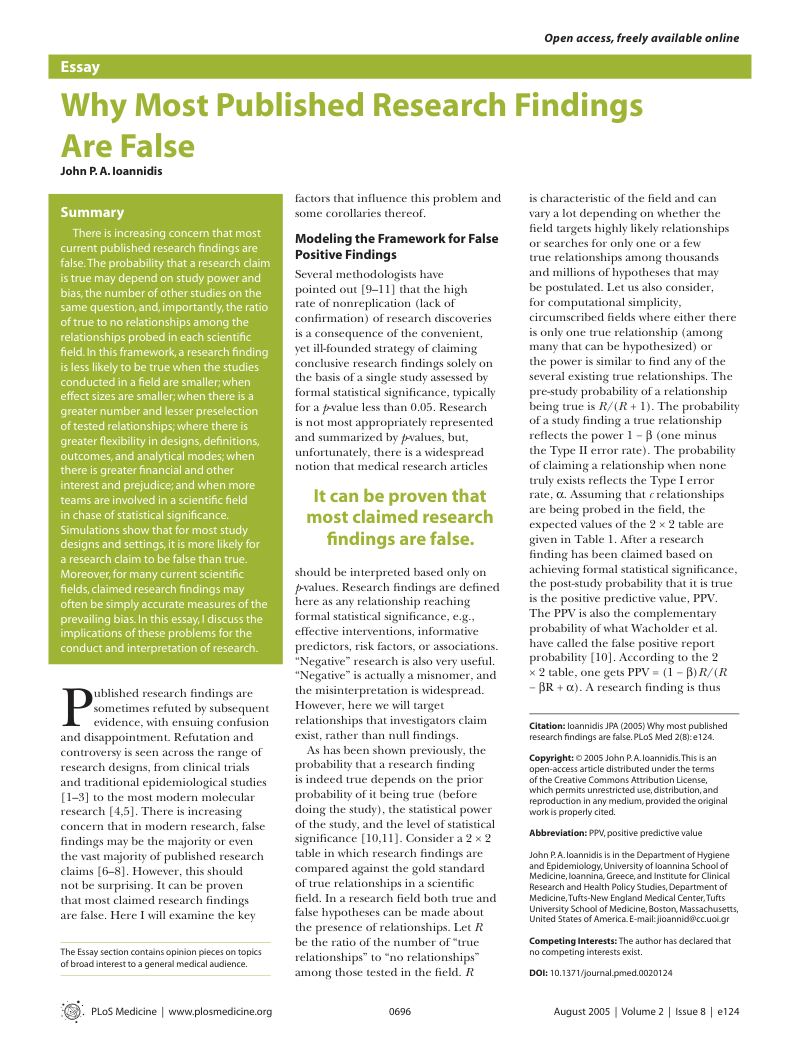
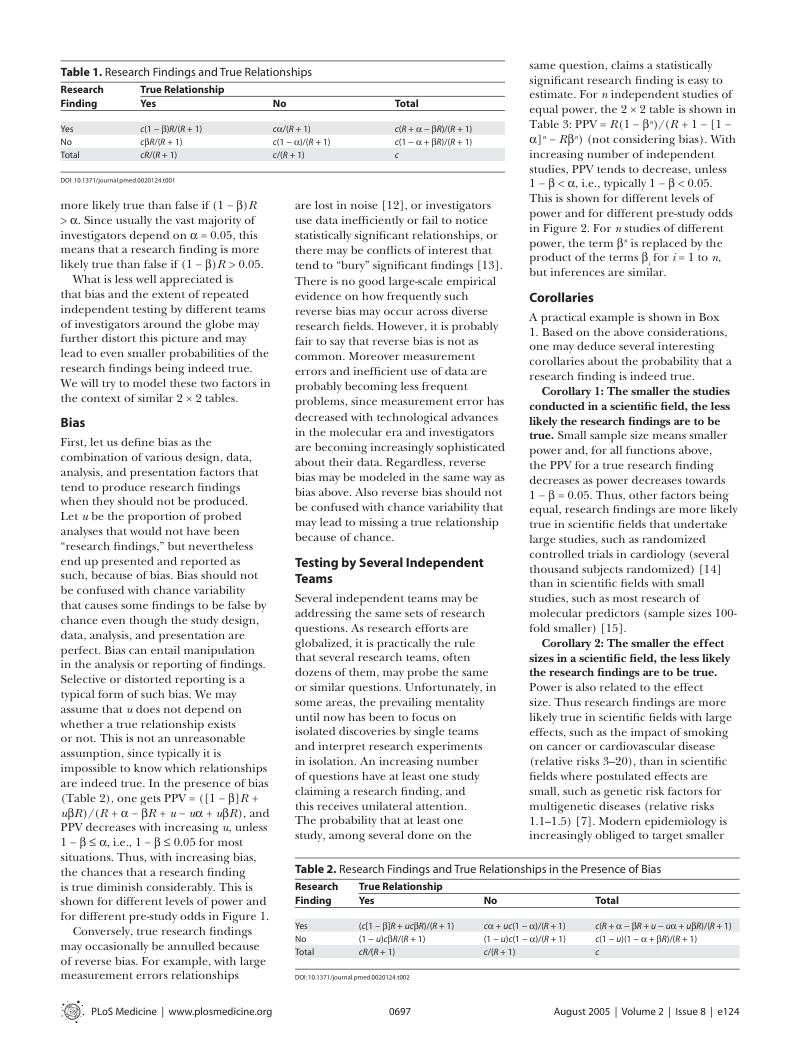
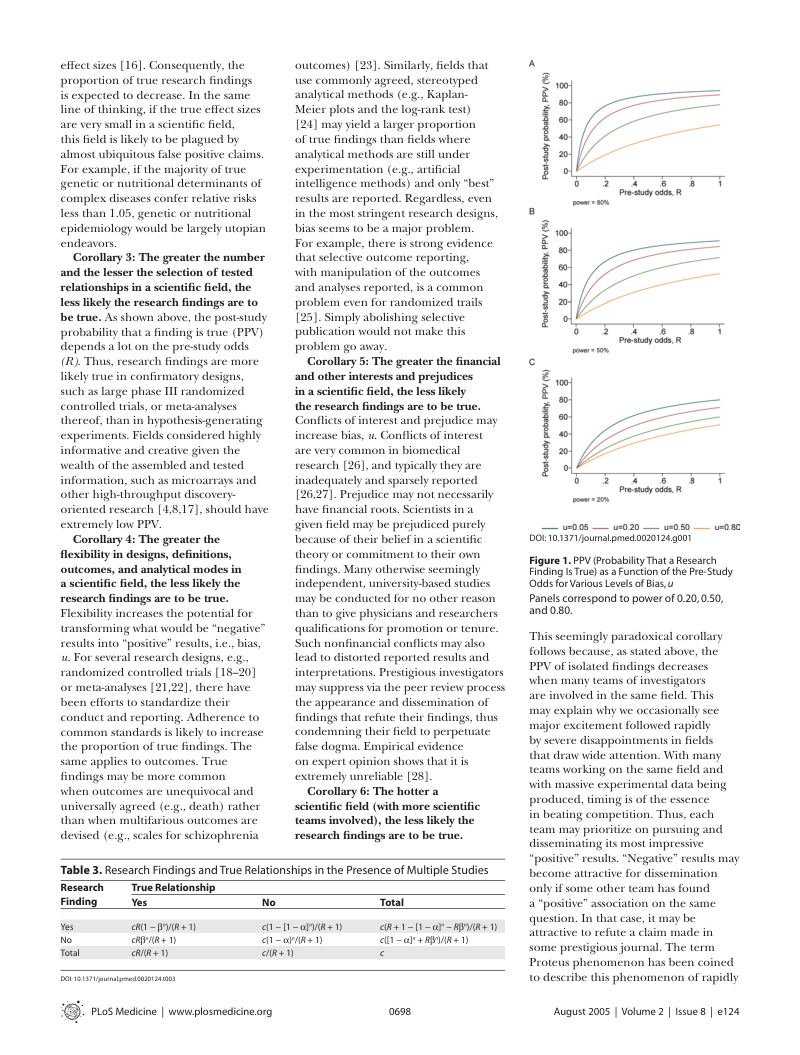
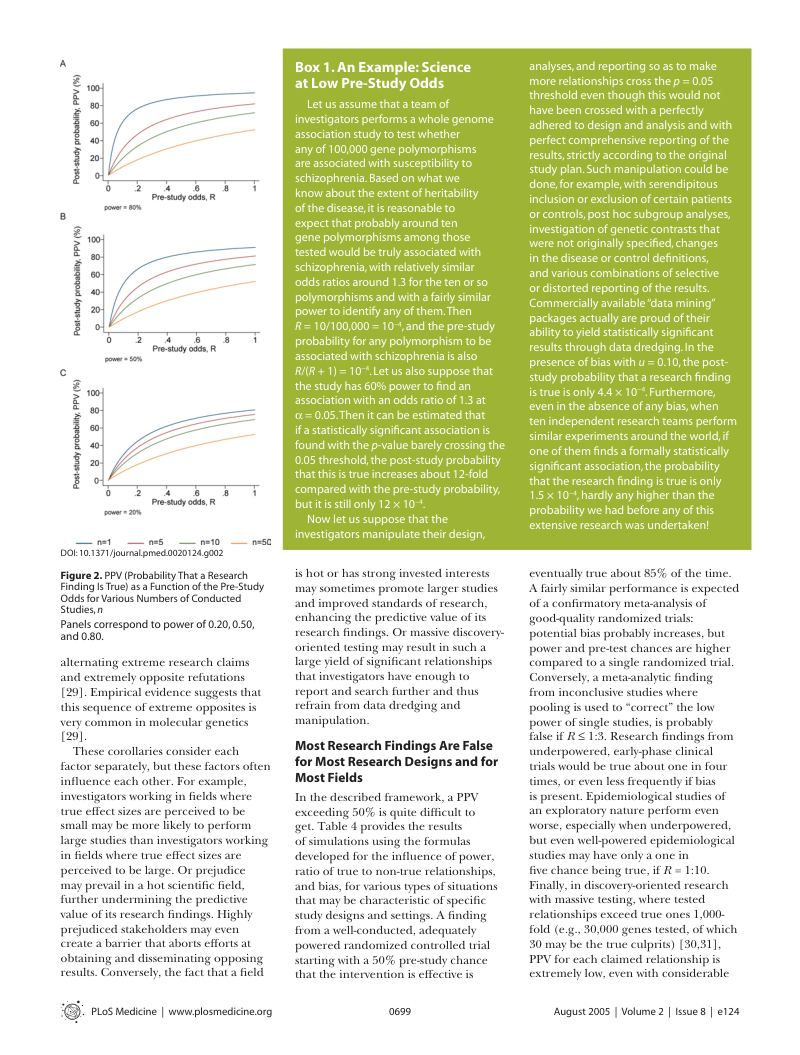
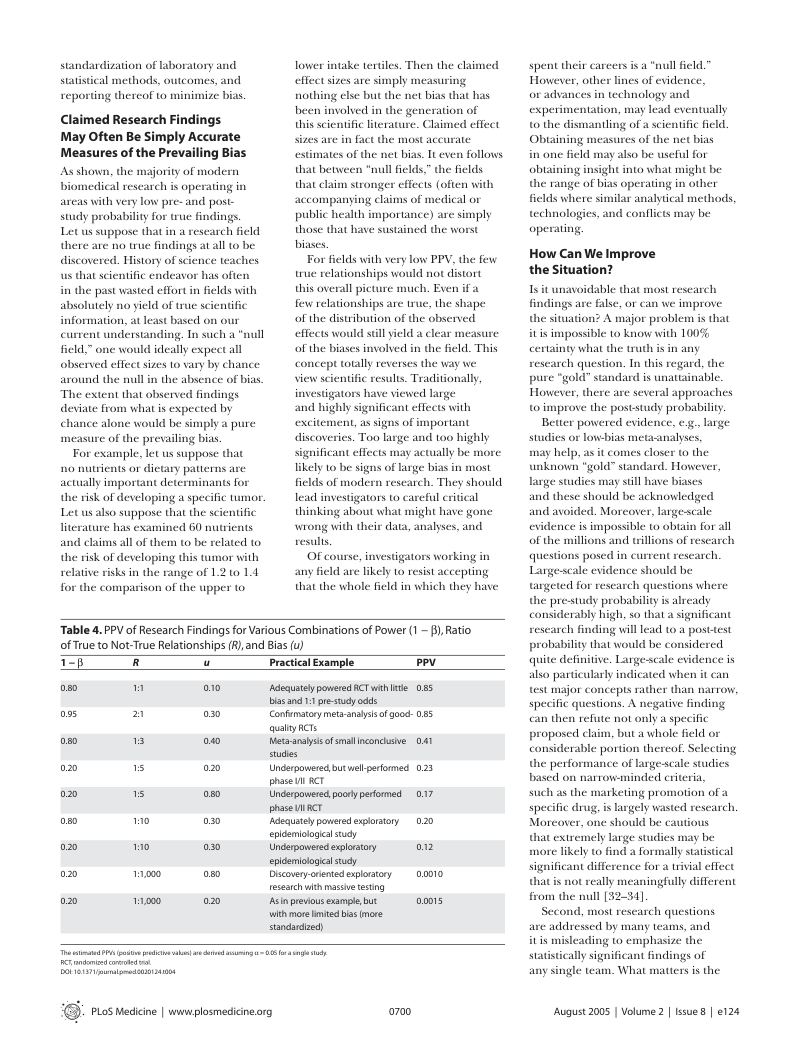
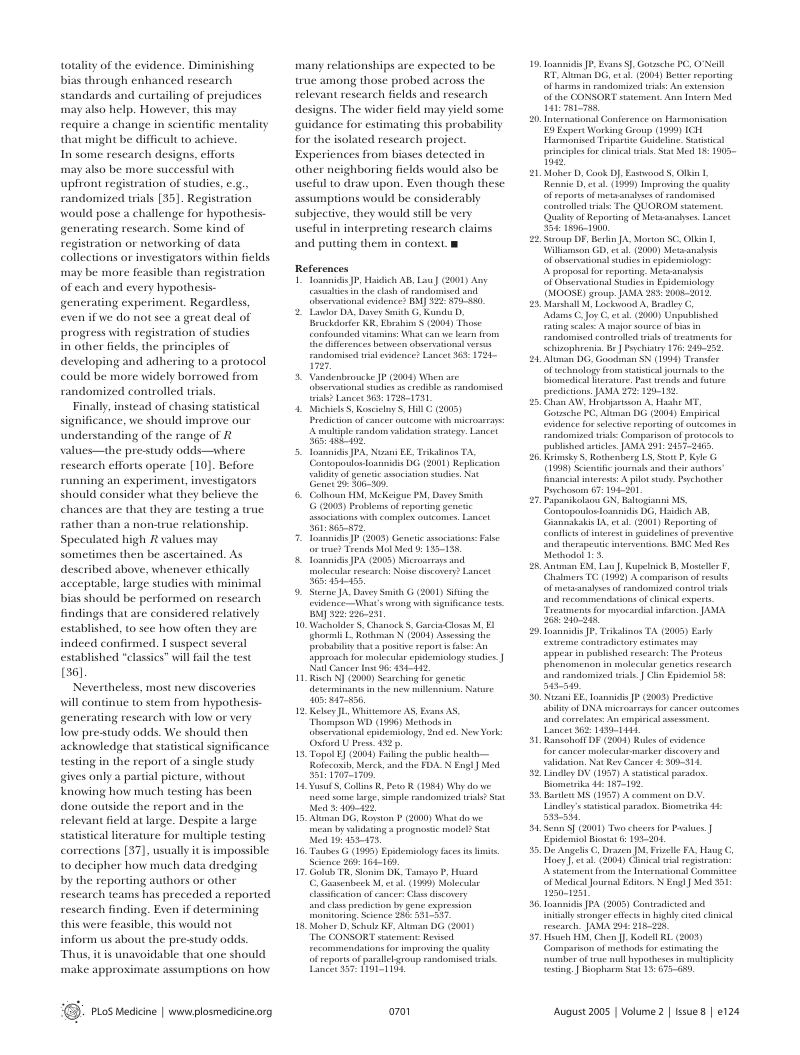
Why most published research findings are false Ioannidis, 2005
Source p.1
Source p.2
Source p.3
Source p.4
Source p.5
Source p.6

Ioannidis JPA (2005) PLoS Med 2(8): e124 · CC BY 4.0

PDFPaper6 pages · Just added
20% learned

Done with
just reading.

Listen > Organize > Practice > Repeat
Notely studies differently.

STEP 1

Listen

You just listen, AI takes the notes
Record and captions pile up, then get summarized

More on lecture transcription
Lecture recordingOperating SystemsOperating Systems week 7 · Virtual memory
STEP 2

Organize

Recordings and PDFs in one summary
“This will be on the exam” parts are flagged

More on AI summary
STEP 3

Practice

Don't just read, start solving right away
Every question has an explanation and source page

More on AI quiz
STEP 4

Repeat

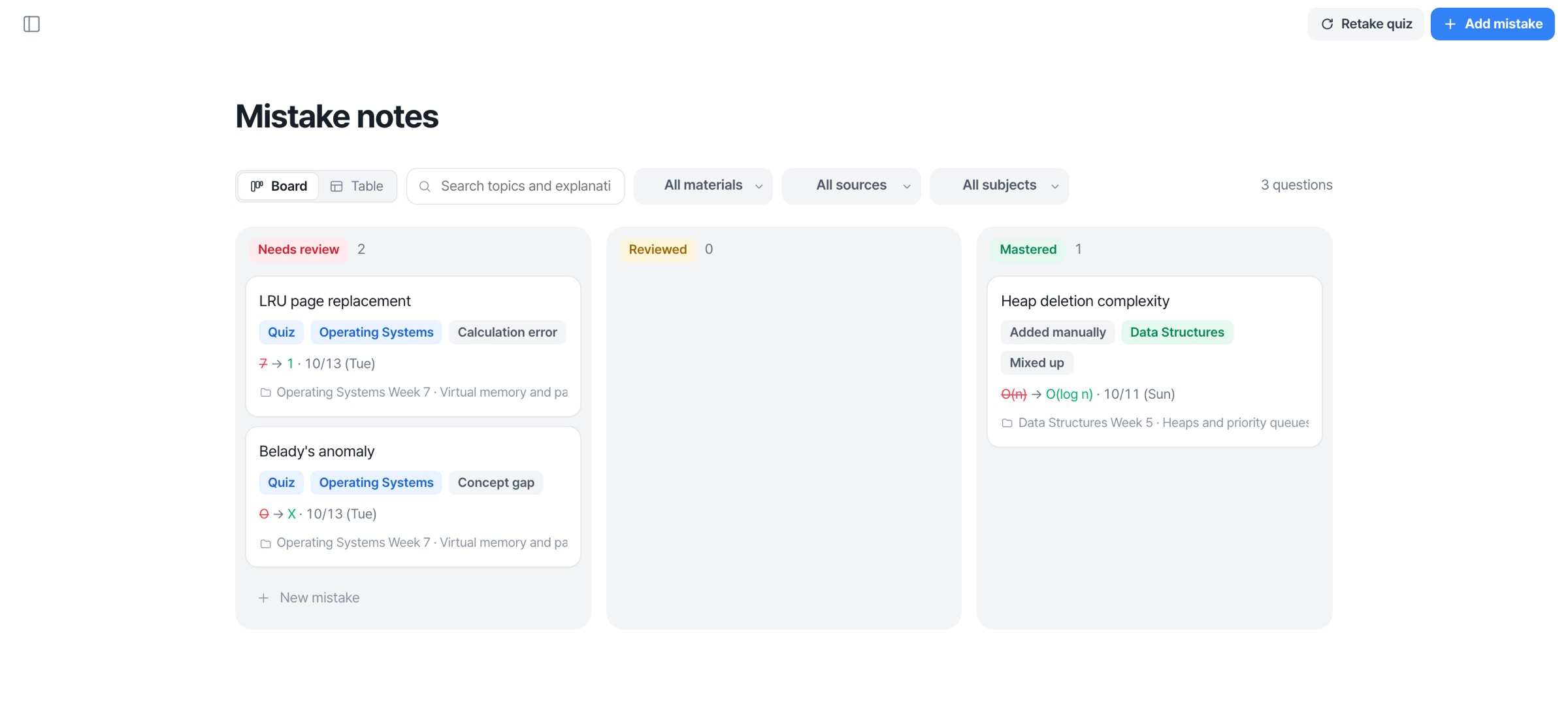
Missed questions go to mistake notes
Back again right before you forget, all the way to D-day

More on flashcards

Enter your assignment,
get it back as a file

WordPowerPointPDF
Assignment brief
1
2
3

References

DOCXAnalyzing the effect of minimum wage increases on the labor market

Question 1. Labor market equilibrium analysis

1200 − 20W = 200 + 30W → W* = 20, employment L* = 800 workers

Question 2. Wage elasticity of labor demand
IndustryElasticityEmployment changeA−0.2≈ −2%B−1.5≈ −15%
Question 1-④ graph

Figure 1. Labor market equilibrium and minimum wage

See the real screens
at a glance

Lecture transcription Live captions as you speak, then a summary.
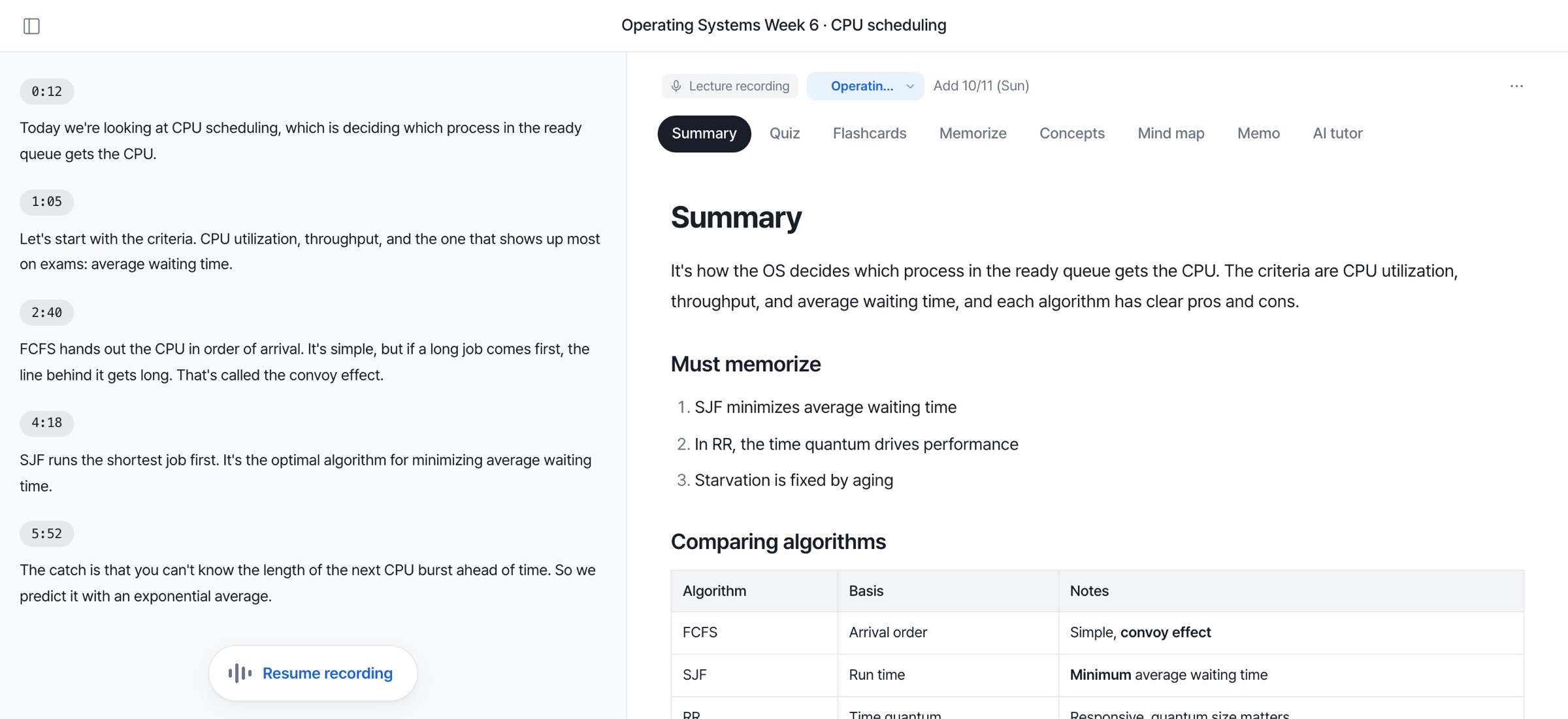
Lecture transcription screen: timestamped captions and summary

Summary Right next to the original PDF, with source page numbers.

Summary screen: summary beside the source, must-memorize points and section notes

Quiz 4 question types, instant explanations when you miss.
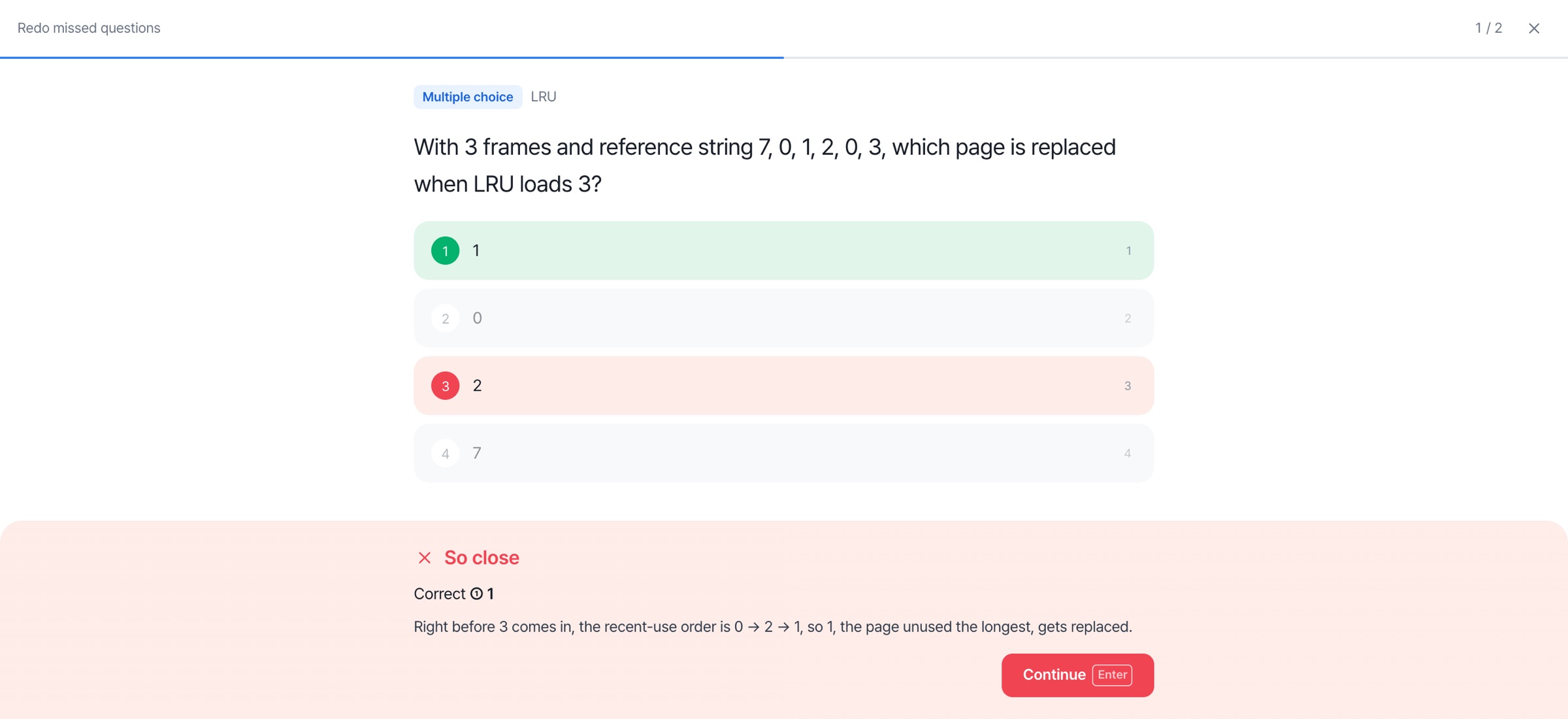
Quiz screen: answer check and explanation

Flashcards Just rate them, and they come back right before you forget.
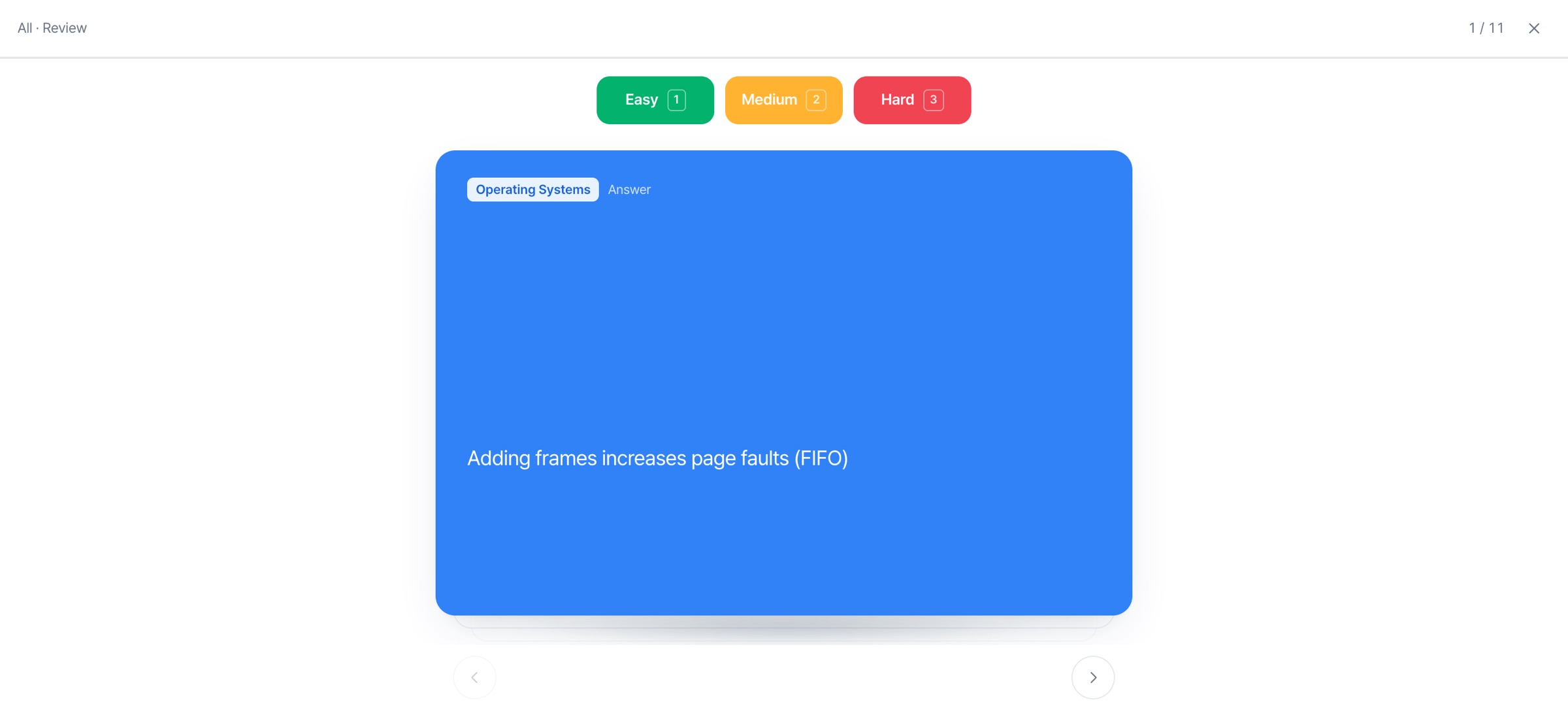
Flashcard review screen: answer side with Easy, Medium and Hard buttons

Mind map A unit's structure on one page.

Mind map screen: concept structure of virtual memory

Concepts Flip through one at a time to memorize.

One-at-a-time concept screen: importance dots, definition, details, example and Easy, Medium and Hard buttons

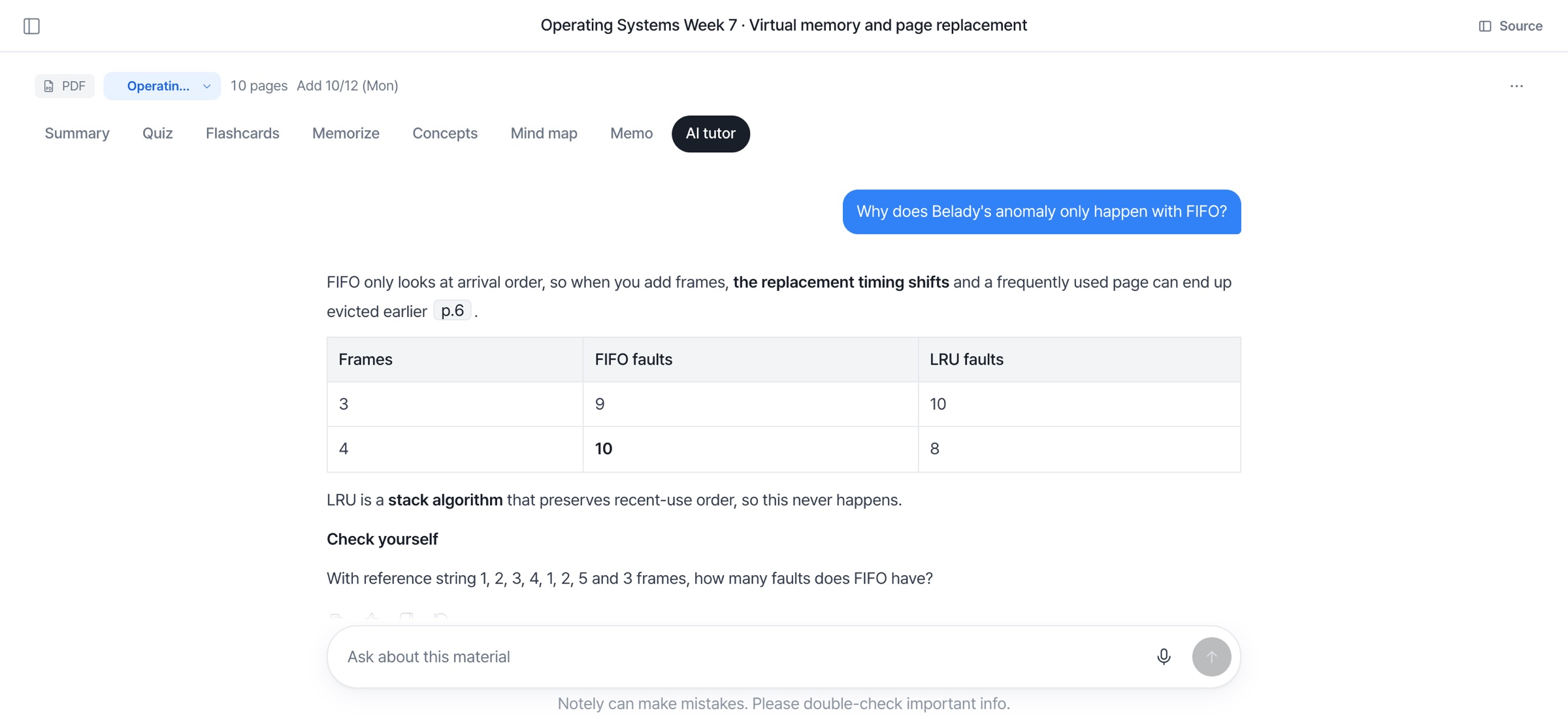
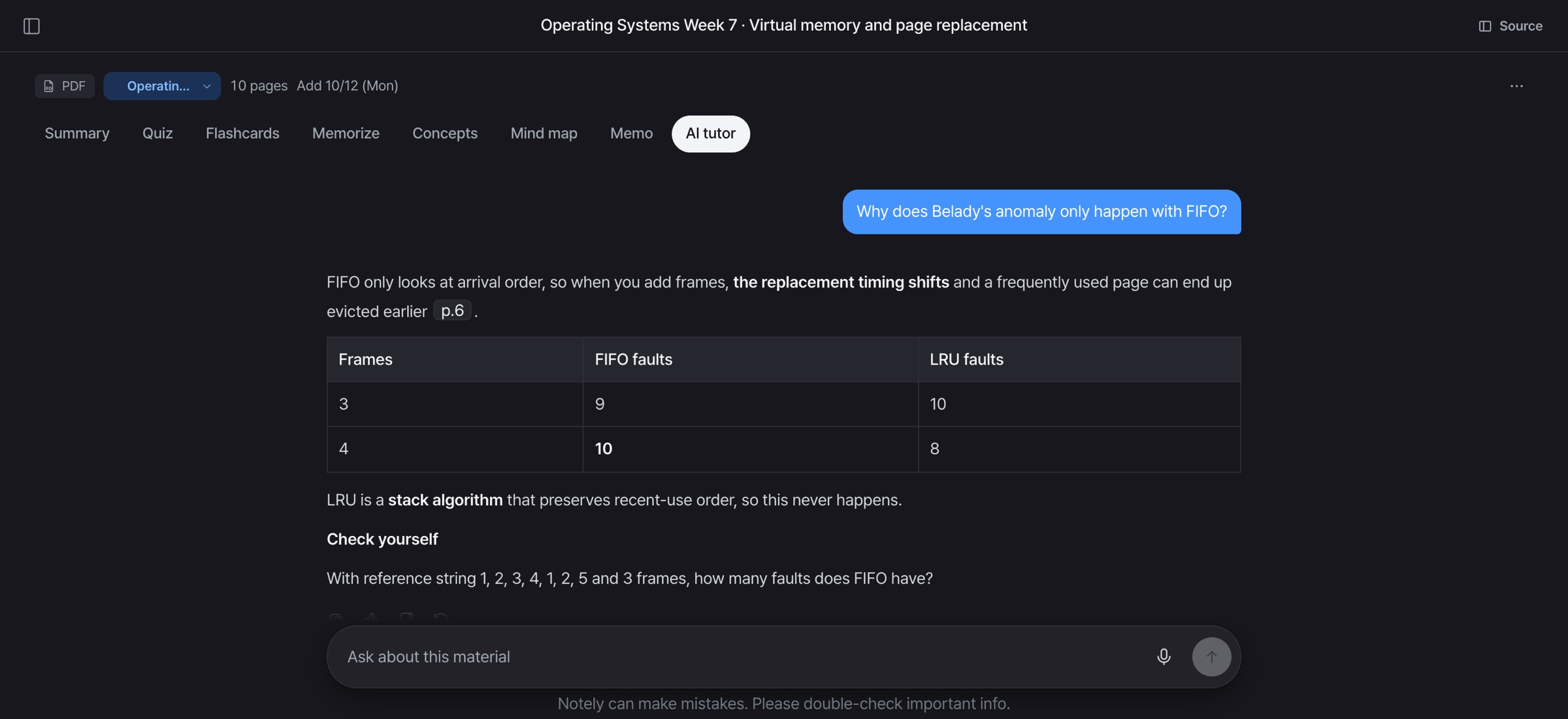
AI tutor Answers based on your materials.

AI tutor screen: answer based on your materials with a comparison table

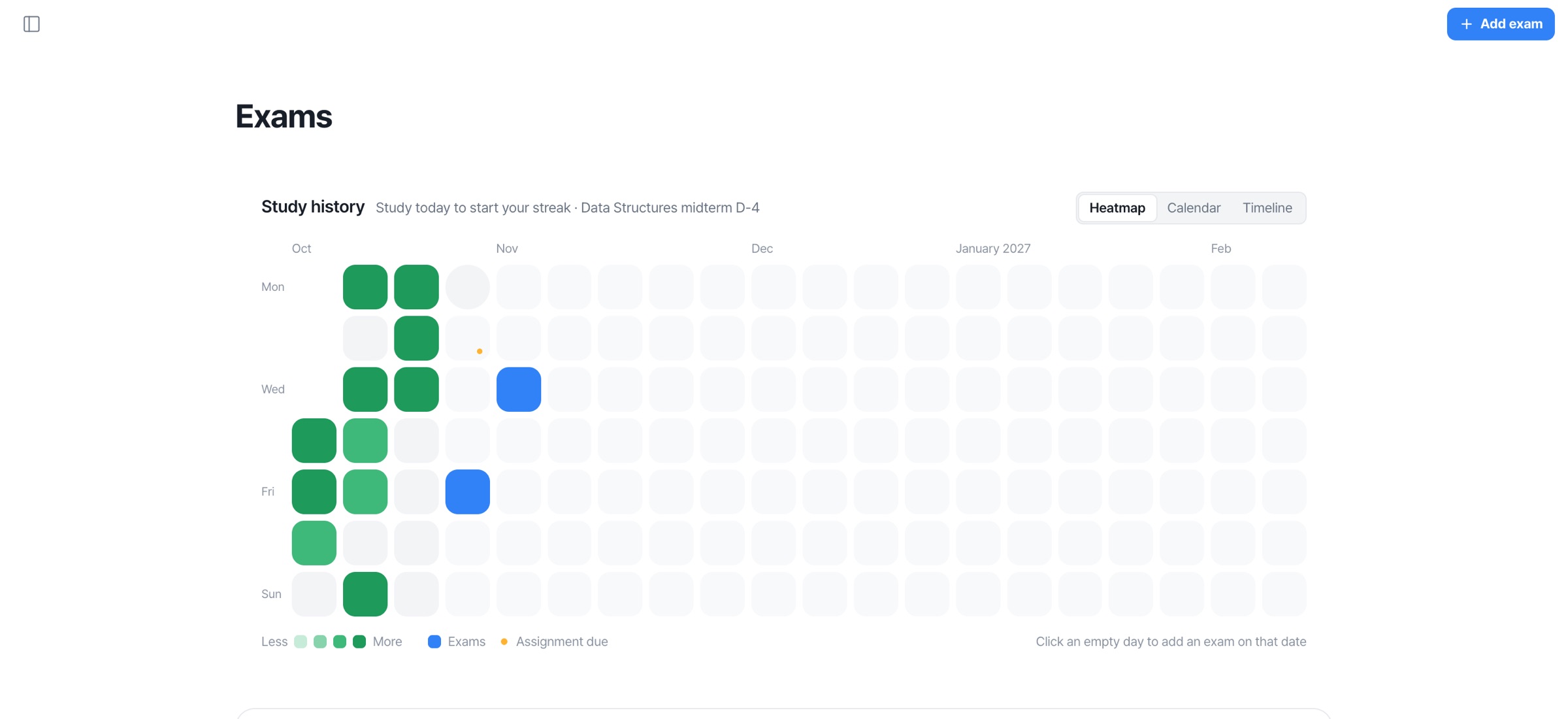
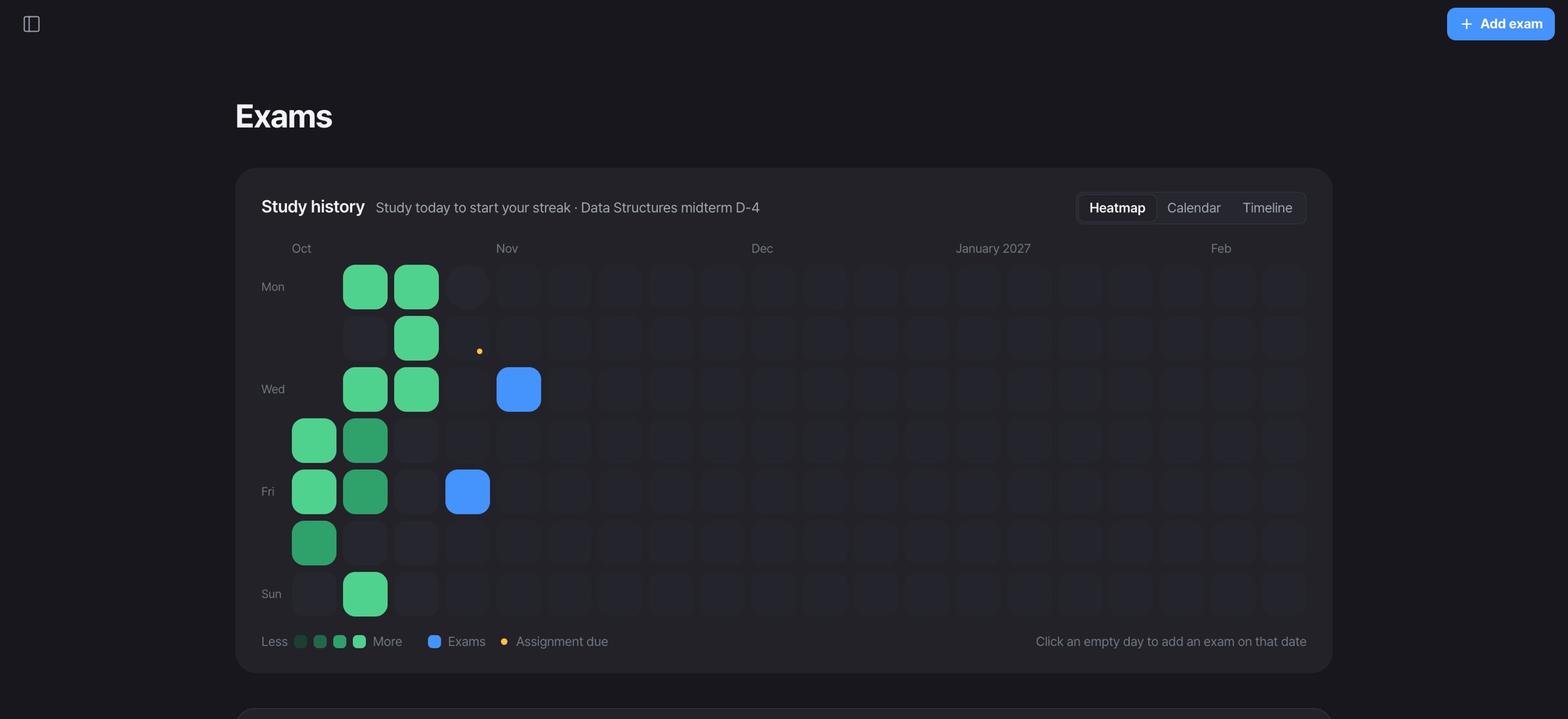
Exams D-day and progress at a glance.

Exams screen: study history heatmap with D-day and progress for each exam

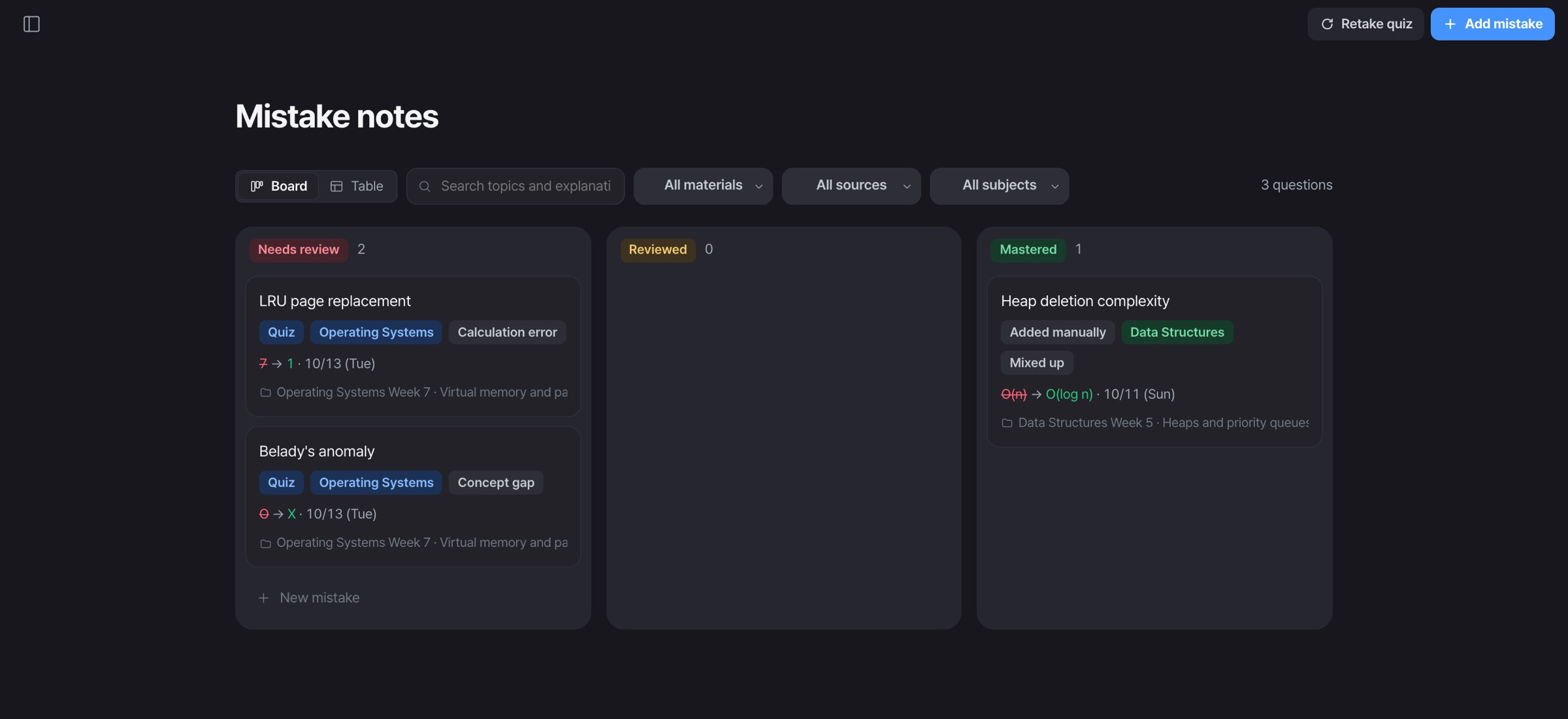
Mistake notes Missed questions collect themselves.

Mistake notes screen: Needs review, Reviewed and Mastered boards

Scattered study apps, now all in one

No more jumping between summary, flashcard and Q&A apps.

AI summary — side by side with the source

Source page numbers, plain explanations and must-memorize points.

  • LRU evicts the least recently used page. p.5
  • With FIFO, faults can increase even with more frames (Belady). p.6

Flashcards

At 1·3·7·14·30-day intervals, they come back right before you forget.

Mind map

Maps out how concepts connect.

AI tutor — grounded in your materials

Answers based on the materials you upload.

Why does Belady's anomaly only happen with FIFO?
FIFO only looks at arrival order, so with more frames frequently used pages can get pushed out first. LRU is a stack algorithm, so it's fine.

Exam D-day

Tells you just what to do today.

Assignment AI

Assignments as Word · PDF · PPT files.

Study history

Study days, exam dates and deadlines on one calendar.

Less time organizing More time understanding And in the exam room, confidence.

Less time,
deeper understanding

8tools

Study tools from a single material

4types

Quiz types (multiple choice, case-based, O/X, short answer)

5steps

Spaced repetition review intervals (1–30 days)

₩0

To start. Use it free right away

For every moment of exam season

These examples are reconstructed from real use cases.

“400 slides, 3 days before the exam. It saved me”

I skimmed the summary for the big picture, then just kept cycling the quizzes. One less all-nighter.

Harvard University logoHarvard Junior, Economics
“My professor talks way too fast to take notes”

I just hit record and the transcript builds itself. After class the summary shows exactly what I missed.

Stanford University logoStanford Freshman, Computer Science
“I used to get stuck on every research paper”

It pulls out the research question, methods and limitations as cards. Lab meeting prep takes half the time.

MIT logoMIT PhD student, EECS
“Three deadlines landed in the same week”

I pasted in the assignment brief and got a checklist, so I never wasted time deciding where to start.

Yale University logoYale Sophomore, Political Science
“I forget things no matter how many times I review”

It only shows the cards due today, so I do 15 minutes on the train. Got through pharmacology this way.

Princeton University logoPrinceton Senior, Molecular Biology
“When the exam countdown makes me anxious”

Seeing the D-day pace and doing just today's share takes the edge off. Small thing, big difference.

UC Berkeley logoUC Berkeley Sophomore, Psychology
“No past papers for this class, but the practice questions hit”

I added the exam materials, worked through the predicted questions, and similar ones showed up on the final.

Columbia University logoColumbia Junior, Mechanical Engineering
“When stats class broke my brain”

I ask the tutor to re-explain using my own lecture slides, and it uses the same wording as the course.

UCLA logoUCLA Sophomore, Statistics
“Making a mistake log for circuits was a chore”

Missed questions collect on their own. The night before the exam I just redid those.

University of Michigan logoMichigan Sophomore, Electrical Engineering
“Finally used all those photos of my notes”

I uploaded handwritten pages and it read them better than I expected. Scattered notes, one clean notebook.

University of Oxford logoOxford Second year, History
“Flashcards are the best for anatomy terms”

No making cards by hand. They come back right when I'm about to forget, so it sticks.

University of Cambridge logoCambridge Second year, Medicine
“I used to run out of time just summarizing”

I let it do the summarizing and spent my time on problems. First time I reviewed twice before an exam.

Imperial College London logoImperial First year, Chemistry
“Great for sharing notes in group projects”

I sent the summary link and the meeting worked even though nobody had done the reading, haha.

King's College London logoKing's College London Final year, Geography
“When the theories wouldn't connect”

The mind map puts thinkers and theories on one page, so essay questions feel a lot less messy.

LSE logoLSE MSc, Social Policy
“Juggling five courses in finals week”

It tells me how much to do per course today, so I stopped wasting time making schedules.

ETH Zurich logoETH Zurich Bachelor's, Computer Science
“Coming back after a gap year, totally rusty”

I re-uploaded my first-year materials and went through the concept cards. Caught up fast.

TU Munich logoTU Munich Bachelor's, Industrial Engineering
“Surprisingly useful for lab reports”

I paste in my draft and it flags what's missing for each rubric criterion. It doesn't write it for me, which I like.

University of Amsterdam logoUniversity of Amsterdam Bachelor's, Biology
“Studying from slides in a second language”

It summarizes English slides into clear key points, so prep for class takes ten minutes.

NYU logoNYU Junior, Business

For the price of a coffee,
a whole month

The core features are plenty on the free plan.
If you haven't used it within 7 days of payment, you get a full refund.

Free plan

Completely free, ₩0 forever

₩0

Start now, no card needed

  • AI generations 10/month
  • Summary · Quiz · Flashcards
  • Lecture recording 1 hr/month
  • 50 pages per file
Start for free
Most popular

Pro plan

Perfect for students who study every day

₩5,900/mo40% off

Billed yearly · about ₩200 a day

  • AI generations 100/month
  • Lecture recording 15 hrs/month
  • 300 pages per file
  • Mind map · YouTube playlists
  • AI tutor 50/day
Start Pro

FAQ

Is it really free?
Yes. The free plan stays ₩0. With one account, you can pick up the same materials on any of your devices.
What files can I upload?
PDF, PPTX, DOCX and TXT are read with page numbers intact. Scanned PDFs and photos of notes use text recognition (OCR), lectures can be added by mic recording or uploading an audio file, and YouTube transcripts and memos are supported too.
Is AI-generated content accurate?
Every summary and question has a source page number, so you can check it against the original right away. AI can make mistakes, so tap the source to verify anything important.
Are my uploads used to train AI?
No. Your uploaded materials and recordings are never used to train AI models, and you can back them up or delete them anytime.
Can I cancel my subscription anytime?
Yes. You can keep using it for the rest of your billing period after canceling, and if you haven't used paid features within 7 days of payment, we'll refund you in full. See refund policy

This semester,
memorize less, understand more

Start for free right now.